Quantization, Explained: Why Big Models Run on Small Hardware
A 7B model is 14 GB in full precision. A 70B is 140 GB. Quantization is the trick that brings those numbers down to something your machine can hold — and the tradeoff is smaller than most people expect.
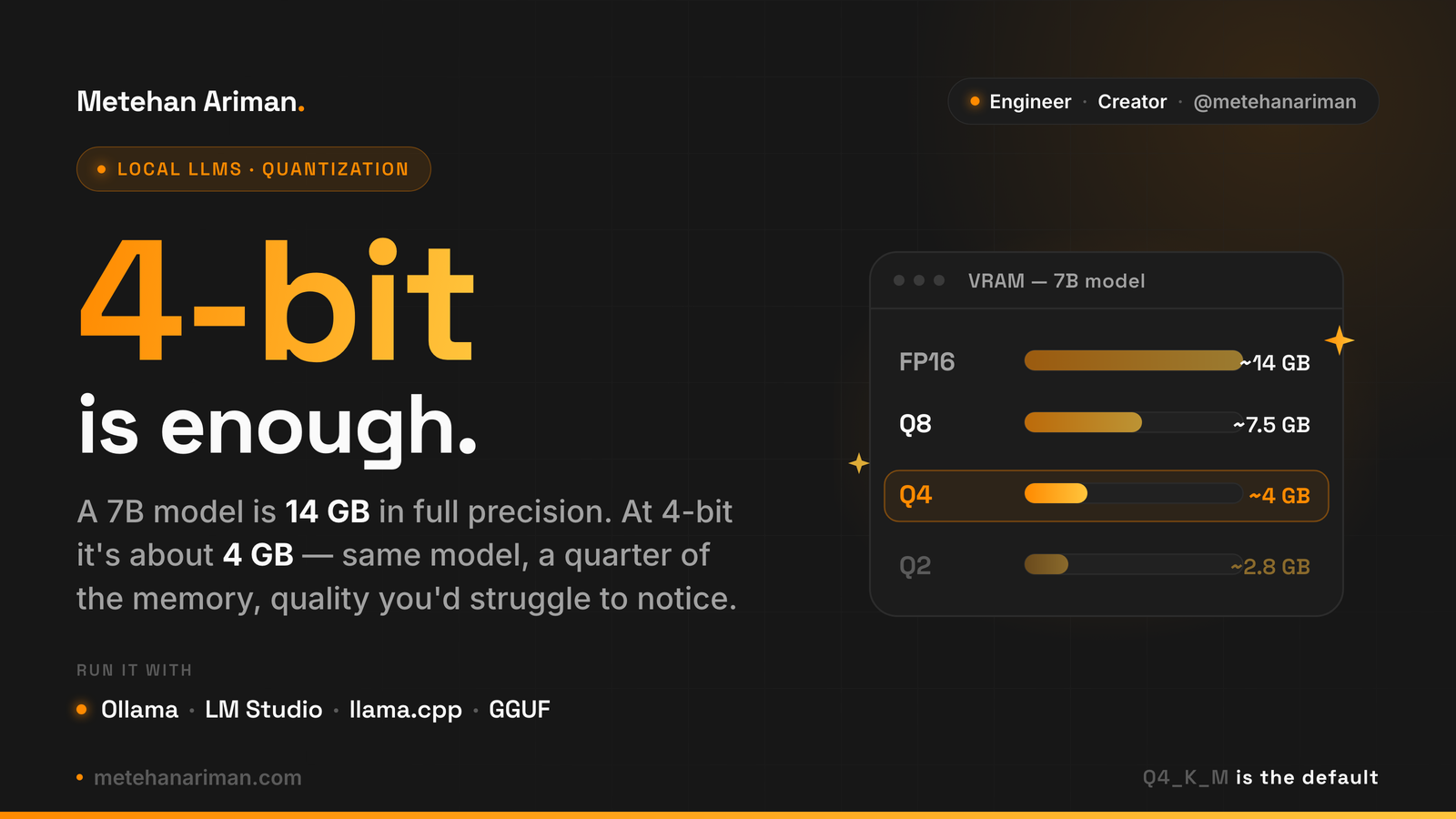
Running a model locally comes down to one number: how much memory it needs to load.
A 7B model in full precision is about 14 GB. A 13B is 26 GB. A 70B is 140 GB. Those are the weights alone, before you account for the context window. Most consumer GPUs ship with 8 to 24 GB, so the math runs out fast — and that’s the wall most people hit the first time they try to run something serious on their own hardware.
Quantization is how you get around the wall. It’s also one of those topics that sounds heavier than it is. The core idea fits in a sentence, and the practical advice fits in one more.
A model is just numbers
Every weight in an LLM is a number stored at some precision. “Full precision” usually means 16-bit floating point — two bytes per weight. That’s where the 7B → 14 GB math comes from: seven billion weights, two bytes each.
Quantization keeps the model and lowers the precision of those numbers. Instead of 16 bits per weight, you store them with 8, 5, 4, or even 2 bits. The weight 0.734182 becomes something like 0.75. You lose detail, but you keep the model — and at 4 bits per weight, the file is a quarter of the size.
That’s the whole mechanism. Everything else is a question of how far you can push it before the model gets noticeably worse.
The payoff scales with the model
For a 7B, quantization is convenient. 14 GB already fits a 16 GB card or an Apple Silicon machine, so dropping to ~4 GB just buys you headroom — a longer context, or room to run something else alongside it.
The real argument shows up at the top of the range. A 70B at full precision needs around 140 GB. Nothing you can buy as a single consumer GPU touches that. Quantize it to 4-bit and it lands near 40 GB, which fits a 64 GB Mac or a workstation card. The difference isn’t “saves memory” anymore. It’s the difference between running the model on one machine and not running it at all.
| Model | FP16 | Q4 |
|---|---|---|
| 7B | ~14 GB | ~4 GB |
| 13B | ~26 GB | ~7.5 GB |
| 70B | ~140 GB | ~40 GB |
The bigger the model, the more quantization is doing for you.
The ladder of precision
Quantization isn’t one setting. It’s a ladder, and each rung trades quality for size.
- FP16 (16-bit) — full precision, the baseline. ~14 GB for a 7B.
- Q8 (8-bit) — half the size, quality essentially indistinguishable from full precision.
- Q5 (5-bit) — a small, hard-to-notice drop.
- Q4 (4-bit) — a quarter of the size, with a quality loss most people never see in normal use. ~4 GB for a 7B.
- Q3 (3-bit) — starting to degrade.
- Q2 (2-bit) — small and noticeably worse.
The pattern that matters: quality holds up well down to about 4-bit, then falls off a cliff. From FP16 to Q4 you’re shaving size while keeping nearly all of the model’s behavior. Below Q4, each bit you remove costs more than the last — the model starts losing reasoning, dropping instructions, and making things up.
If you measure it with perplexity, the curve is almost flat from 16-bit down to 4-bit, then bends sharply. That bend is why Q4 ended up as the default everyone converged on. It sits right at the knee.
So what should you actually run?
Three rules cover almost every case.
Start at Q4_K_M. If you’re on the llama.cpp / GGUF ecosystem — which is most local setups — the quants come in variants like _K_S, _K_M, and _K_L (small, medium, large k-quants). Q4_K_M is the one to default to. It fits most GPUs and the quality you give up is the kind you have to go looking for.
More parameters beats more bits. Given a fixed memory budget, a bigger model at a lower quant usually outperforms a smaller model at a higher quant. A 13B at Q4 tends to out-think a 7B at Q8, even though they take similar space. When you’re choosing how to spend your VRAM, spend it on parameters first.
Drop below Q4 only when you’re forced to. Q3 and Q2 exist for when a model otherwise won’t fit at all. They’re a last resort, not a way to chase speed. If Q4 fits, run Q4.
You don’t quantize anything yourself, either. Ollama, LM Studio, and llama.cpp all pull ready-made GGUF quants — you pick the tag and download it.
The part worth testing yourself
The numbers in this post are the well-known ones, and they’re a good starting map. But quantization’s effect isn’t uniform across models or tasks. Some models tolerate aggressive quantization better than others. Code and structured output tend to suffer earlier than casual chat. A quant that feels fine for summarizing can fall apart on a task that needs precise reasoning.
So treat Q4_K_M as the default, not the verdict. Pull the model at Q4, run it on the work you actually do, and only reach for a higher quant if you can feel the difference on your own tasks. Most of the time you won’t — which is exactly why a 14 GB model running in 4 stopped being a compromise and became the normal way to run LLMs locally.